Google Opal is a no-code AI app builder
Google Opal is a no-code AI app builder introduced by Google Labs in 2025. It’s designed to let anyone—no coding skills required—build and share mini-AI apps simply by typing what they want in plain English.
? Table of Contents
Table of Contents
- What is Google Opal
- Key Features
- How Google Opal Works
- What You Can Build with Opal
- Examples and Case Studies
- How to Access and Use Opal
- How to Share Opal Apps
- Benefits for Professionals
- Use Cases by Industry
- Learning Resources & Tutorials
- Strengths & Limitations
- Why It Matters
? What is Google Opal?
Google Opal is a no-code AI app builder launched under Google Labs. It allows users to create “AI-powered mini-apps” through natural language instructions, without writing code. The technology is referred to by Google as “vibe coding”—you describe your idea, and Opal builds the app logic for you.
- Think of it like ChatGPT meets drag-and-drop editor.
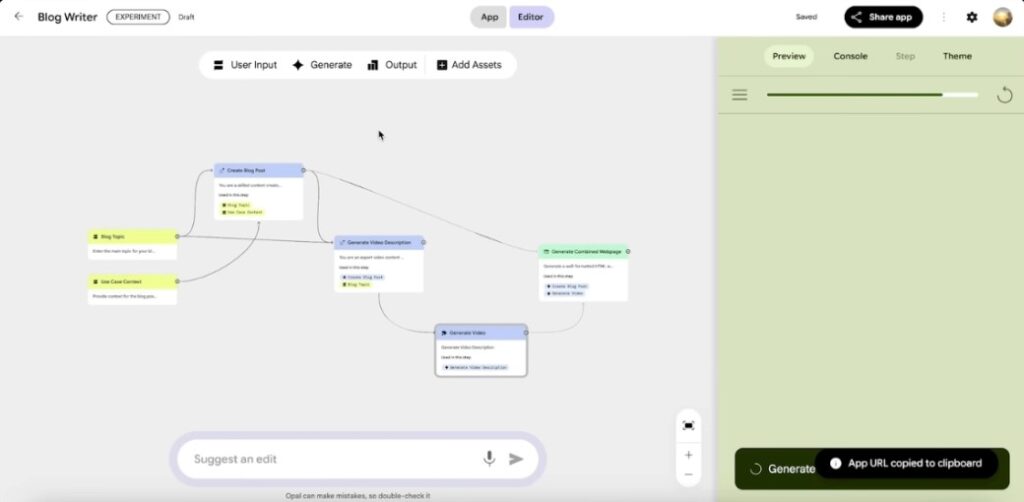
- Every app is built as a flow: Input → AI Task → Output.
- You can use or remix prebuilt templates or start from scratch.
- Once ready, the app can be shared with a link like a Google Doc.
Opal is Google’s experimental no‑code AI app builder introduced under Google Labs. It lets anyone—no coding needed—create AI mini‑apps by writing simple natural‑language prompts. Google Developers Blog
- Known as “vibe‑coding”, you describe what you want in plain English and Opal builds it.
- Works via a chat interface + visual editor: chain logical steps like input → model call → output.TECHi
- Offers a starter template gallery (e.g. summarizer, quiz generator) that you can remix.Baytech Consulting
- Supports instant sharing: publish your mini‑app on web and share a live link. Recipients log in with Google to use. Google Developers Blog
- Currently in US‑only public beta via Google Labs. Google Developers Blog
- Learn more on other free web tools from MarketingBox.in.
? Official site: labs.google
✨ Key Features of Google Opal
| Feature | Description |
|---|---|
| Prompt-based creation | Use plain language like “make a quiz generator” |
| Visual flow builder | See and edit app steps in a diagram view |
| Chat interface | Chat with Opal to modify functionality |
| Templates | Start with ready-made app flows |
| Easy sharing | Get a link to share your app instantly |
| Instant testing | Preview output live before sharing |
Source: Google Developers Blog
⚙️ How Google Opal Works
Step-by-Step Process
- Log in at labs.google (Currently US-only)
- Describe your app: e.g., “Create a customer support reply tool.”
- Opal creates a visual workflow with inputs, models, and outputs.
- Customize using:
- Chat interface
- Visual flow diagram
- Test your mini-app instantly.
- Share the app with a public link.
?️ What You Can Build with Opal
Here are examples of mini-apps built using Opal:
- ✍️ Email response assistant: input → summarize → rewrite → send
- ? Meeting summarizer: transcript in → summary out
- ? Schedule planner: tasks in → day plan out
- ? Social caption generator: blog in → tweet/Instagram post out
- ? Quiz builder: text → generate MCQs
- ?️ Workout planner: goal → plan → reps & tips
- Text summarizer: condense articles to bullet points
- Support email generator: craft empathetic replies from summaries
- Marketing copy writer: rewrite content in brand tone
- Planner or scheduler: generate daily agendas or task lists
- Custom workflows: e.g. quiz maker, content analyzer, social media caption tool.Baytech ConsultingMedium
Inspired by Daniel Ferrera’s review
? Examples and Case Studies
Case Study: Fitness Planner App
- User: Developer with no AI background.
- Prompt: “Create a calisthenics trainer that suggests routines based on experience.”
- Result: Working app in 10 minutes with custom inputs and AI-generated tips.
Case Study: Customer Support Tool
- Prompt: “Build an app that reads a support ticket and drafts a polite reply.”
- Output: A two-step workflow using a summarizer + tone modifier.
Full story on Medium
? How to Access and Use Opal
- Join Google Labs (US-only): https://labs.google
- Start with a prompt (e.g. “Summarize news articles”)
- Customize with AI blocks (input, transform, output)
- Edit visually or through chat
- Test your flow live
- Click Share → Copy link → Done!
Your app is hosted like a Google Form – people access it with their Google account.
? How to Share Opal Apps
- Click the Share button.
- Choose Anyone with link.
- Others can interact with the app, not edit it.
- Add your branding/text inside the app before sharing.
?? Benefits for Professionals
| Role | Use of Opal |
|---|---|
| Marketers | Create content rewriters, campaign briefs |
| Educators | Build quiz generators, flashcard tools |
| Startups | Prototype AI tools before hiring devs |
| Writers | Rewrite content in different tones/styles |
| Support teams | Build ticket responders |
| Students | Build study helpers and project planners |
- Marketers: automate content creation, schedule planning, campaign briefs.
- Customer support teams: auto‑draft replies from ticket data.
- Educators/trainers: build quizzes, lesson summaries, learning tools.
- Media creators: tool to transcribe, caption, classify video scripts.academy.optimizely.com
- Small businesses: tailor business process tools without programmers.
- Enterprises: empowers subject‑matter experts to prototype AI workflows fast. But may risk shadow IT; governance needed.Google Developers Blog+4Baytech Consulting+4vp-land.com+4
? Use Cases by Industry
| Industry | Opal Use Case |
|---|---|
| Healthcare | Symptom checker (non-medical), instruction generator |
| Retail | Product description builder, chatbot tools |
| Finance | Auto-generate reports from input data |
| Education | Lesson summarizer, worksheet generators |
| HR | Resume shortlister, candidate email generator |
| Legal | Contract summarizers (basic use) |
| Media | Script to caption generators, summarizers |
✅ How to Use & Share
- Go to labs.google.com, sign in, join Opal beta.
- Describe your app: e.g. “Make a quiz generator from YouTube transcripts.”
- Let Opal generate a visual workflow.
- Edit via chat or visual editor—modify steps easily.
- Test, then hit Share → get public link.
- Others open link, log in, and use your app directly.
? Learning Resources & Tutorials
? Videos
? Articles & Blogs
⚖️ Strengths & Limitations
✅ Strengths
- Extremely fast to prototype apps
- No coding required
- Great for writers, marketers, educators
- Intuitive interface
- Zero‑code, intuitive natural‑language input.
- Fast prototyping and sharing.
- Good for front‑end logic, text workflows, planning tools.
❌ Limitations
- US-only (for now)
- No real-time database or API hooks
- Not for heavy back-end logic
- Lacks export/import of app logic
- Enterprise governance might be needed to prevent misuse
- Suitable only for basic mini‑apps; lacks heavy backend or real‑time data capabilities. LinkedIn
- Currently US‑only beta access.
- Risk of ungoverned apps in firms (“shadow IT”)—needs oversight. Baytech Consulting
? Why It Matters
Opal marks a shift toward agentic, conversational software creation. It bridges a gap for creators and professionals—letting workflows and productivity improve without requiring engineering skills. It aligns with future of AI‑driven tools embedded in Google’s ecosystem. LinkedIn SiliconANGLE Google Developers Blog
✅ TL;DR Summary
- Google Opal is a no-code AI mini-app builder.
- Describe your idea in English → Opal builds the app logic.
- Edit visually or through chat.
- Apps are easily shareable via links.
- Ideal for marketers, educators, writers, and small teams.
- Free, experimental, currently in US-only beta.
| Topic | Summary |
|---|---|
| What is Opal | Google’s no‑code AI mini‑app builder |
| How it works | Prompt → visual workflow → shareable app |
| Apps you can build | Summaries, planners, forms, quiz, planners |
| Who benefits | Marketers, educators, support teams, SMEs |
| Strengths | Fast, no code, shareable |
| Limitations | US‑only, simple apps, shadow IT risk |
| Learning resources | Video guides + official blog + templates |
#GoogleOpal #OpalTutorial #GoogleLabs #AITools #NoCode #AIBuilder #GoogleAI #NoCodeTools #NoCodeAI #AIApps #BuildWithoutCode #AIAutomation #OpalGuide #NoCodeGoogle #PromptEngineering #PromptApps #NoCodeBuilder #OpalAI #NoCodeForAll #CitizenDevelopers #AIforEveryone #FreeAITools #CreateWithAI #AIWorkflows #NoCodeAutomation #WorkflowBuilder